Study Viral (Java Tutorials For Beginners - Step By Step)
  • Home
  • Java Tutorials
    • Core Java
    • Java Swing
    • MS Access JDBC Java Application
  • Facebook Page
  • Programs
    • C Programs
    • C++ Programs
    • Java Programs
    • Python Programs
  • UGC NET
  • Home
  • Java Tutorials
    • Core Java
    • Java Swing
    • MS Access JDBC Java Application
  • Facebook
  • Programs
    • C Programs
    • C++ Programs
    • Java Programs
    • Python Programs
  • UGC NET
Showing posts with label Java Tutorials. Show all posts

Java Program 32 - Java Program to Print Alphabet Patterns - Study Viral

 September 16, 2018     Alphabet Pattern, Java Tutorials     No comments   

Java Program 32 - Java Program to Print Alphabet Patterns - Study Viral


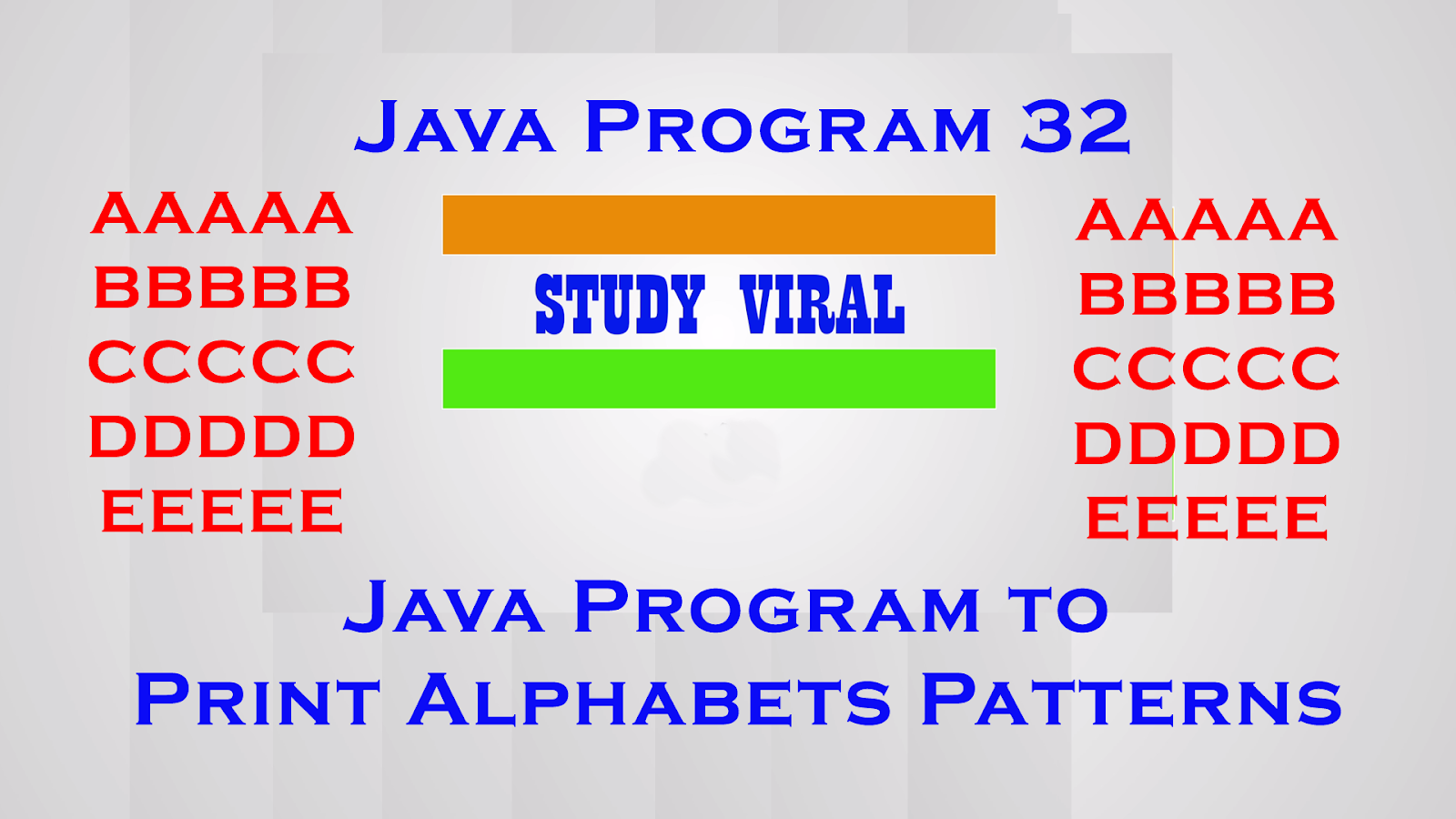
In This Video You Can See how to Make Following
Kind of Alphabet Pattern...

AAAAA
BBBBB
CCCCC
DDDDD
EEEEE


Email :: info@studyviral.in
Or
Email :: studyviral.in@gmail.com 
Website:: www.StudyViraL.in 

Facebook Page ::  https://www.facebook.com/StudyViral.in/
For Suggestions You Can Email :: info@studyviral.in
http://studyviral.blogspot.in/
Read More
  • Share This:  
  •  Facebook
  •  Twitter
  •  Google+
  •  Stumble
  •  Digg

Java Swing Application - Calculate Age From Date of Birth Using JCalender - Study Viral

 September 14, 2018     Find Age from Date of Birth, Java Swing, Java Tutorials, JCalender     No comments   

Java Swing Application - Calculate Age From Date of Birth Using JCalender - Study Viral


This video helps you to calculate Age of a Person From Date of Birth using JDateChooser Component of JCalender

For this i am using  jcalendar-1.4.jar and add this jar to Netbeans Palette

Link to Download JCalender


Email :: info@studyviral.in
Or
Email :: studyviral.in@gmail.com
Website:: www.StudyViraL.in

Facebook Page ::  https://www.facebook.com/StudyViral.in/
For Suggestions You Can Email :: info@studyviral.in
http://studyviral.blogspot.in/

Read More
  • Share This:  
  •  Facebook
  •  Twitter
  •  Google+
  •  Stumble
  •  Digg

Java Program 31 - Java Program to Number Patterns - Study Viral

 June 26, 2018     Java Programs, Java Tutorials     No comments   

Java Program 31 - Java Program to Number Patterns - Study Viral

Program No 31
In This Video You Can See how to Make Following
Kind of Number Pattern...

                  1
                1 2 1
              1 2 3 2 1
            1 2 3 4 3 2 1
          1 2 3 4 5 4 3 2 1
        1 2 3 4 5 6 5 4 3 2 1
      1 2 3 4 5 6 7 6 5 4 3 2 1
    1 2 3 4 5 6 7 8 7 6 5 4 3 2 1
  1 2 3 4 5 6 7 8 9 8 7 6 5 4 3 2 1  


Read More
  • Share This:  
  •  Facebook
  •  Twitter
  •  Google+
  •  Stumble
  •  Digg

Java Program 30 - Java Program to Number Patterns - Study Viral

 June 26, 2018     Java Programs, Java Tutorials     No comments   

Java Program 30 - Java Program to Number Patterns - Study Viral

Program No 30
In This Video You Can See how to Make Following
Kind of Number Pattern...

         1
        1 2
       1 2 3
      1 2 3 4
     1 2 3 4 5
    1 2 3 4 5 6
   1 2 3 4 5 6 7     


Read More
  • Share This:  
  •  Facebook
  •  Twitter
  •  Google+
  •  Stumble
  •  Digg

Java Swing - Digital Clock or Watch (Show System Time and Date) - Study Viral

 May 25, 2018     Digital Clock, Digital Watch, Java Programs, Java Swing, Java Tutorials     1 comment   

Java Swing - Digital Clock or Watch (Show System Time and Date) - Study Viral


Java Swing Application - Digital Clock - Study Viral

This Video Helps you to learn how to create simple Digital Clock within Java Swing Application or Program. This is a basic digital clock in Java that works off your operating system time. You can also use the same to show System Date and Time using Netbeans IDE. The Clock will shown on JLabel of java swing Palette by using following classes.

1). Create a Project in Netbeans IDE
2). Create a Package i.e. digital_clock


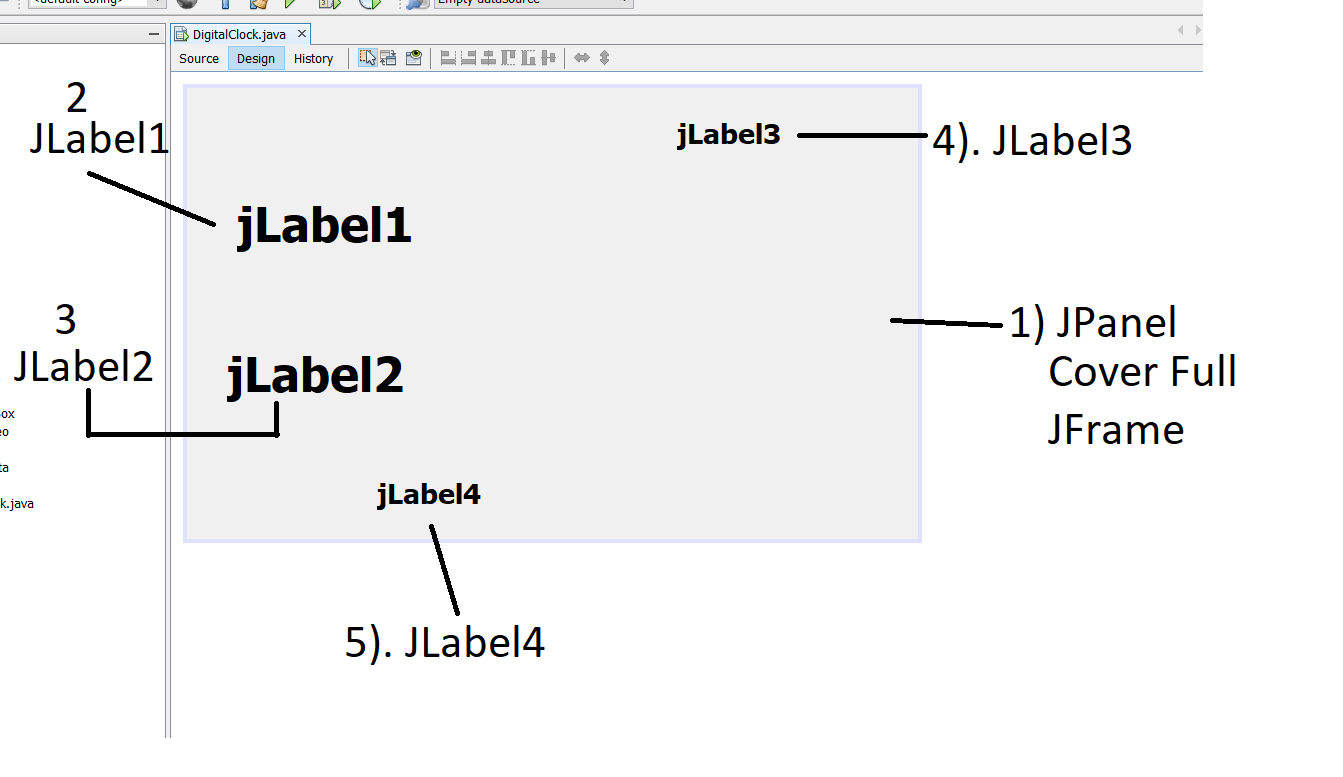
3). In digital_clock package create a JFrame and name it as DigitalClock
4) Now drag-drop JPanel to JFrame and cover the JFrame.
5). Right click on JPanel Select  Set Layout -> Absolute Layout.


 6) Now drag-drop four JLabel to JPanel.

7). Select Source Tab to write java code.

8). Import following Classes

import java.awt.event.ActionEvent;
import java.awt.event.ActionListener;
import java.text.DateFormat;
import java.text.SimpleDateFormat;
import java.util.Date;
import javax.swing.Timer;


9). Create Timer class object in Global Section

Timer timer ; //At Line 19 in given code

Now you have to type code with in Constructor body.
From Line 22 to Line 53

Rest of Code is given below


Email :: info@studyviral.in
Or
Email :: studyviral.in@gmail.com 
Website:: www.StudyViraL.in 
Facebook Page ::  https://www.facebook.com/StudyViral.in/
For Suggestions You Can Email :: info@studyviral.in
http://studyviral.blogspot.in/


Read More
  • Share This:  
  •  Facebook
  •  Twitter
  •  Google+
  •  Stumble
  •  Digg

Java Swing Application for Sending Bulk ( or Mass) E-Mails - StudyViral

 April 29, 2018     Java Mail API, Java Swing, Java Tutorials     No comments   

Java Swing Application for Sending Bulk ( or Mass) E-Mails - StudyViral


Read More
  • Share This:  
  •  Facebook
  •  Twitter
  •  Google+
  •  Stumble
  •  Digg

Java Tutorials 31 - Use of static Keyword in Java - StudyViral

 February 19, 2018     Java Tutorials     No comments   

Java Tutorials 31 - Use of static Keyword in Java - StudyViral


Use of static keyword in Java
static keyword is used in java with following things
1). variables (class variables)
2). methods (class methods)
3). block (i.e. static block)
4). nested class
5). interface static methods (Java 8 onwards..)
6). static with import statement

The static keyword is used in java mainly for memory management. It is used with variables, methods, blocks and nested class. It is a keyword that are used for share the same variable or method of a given class.

Java static Variable
  • We can use static keyword with a variable.
  •  A static variable is a class variable and doesn’t belong to Object/instance of the class. 
  • When a variable is declared as static, then a single copy of variable is created and shared among all objects at class level. 
Java static Methods
  • When a method is declared with static keyword, it is known as static method.
  • A static method can only directly call other static methods.
  • A static method can only directly access static data/variables.
  • A static method cannot refer to this or super keyword.
  • The most common example of a static method is main() method.
Java static Block
  • Java static block is the group of statements that gets executed when the class is loaded into memory by Java CIassLoader.
  • Static block is used to initialize static variables of the class.
  • Mostly it’s used to create static resources when class is loaded.
  • We can’t access non-static variables in static block.
  • We can have multiple static blocks in a class.
  • A static block that gets executed exactly once, when the class is first loaded.
Java static import

Static import allows you to access the static member of a class directly without using the fully qualified name.

e.g.:: import static java.lang.System.out;

This topic will covered with package in Java.


Read More
  • Share This:  
  •  Facebook
  •  Twitter
  •  Google+
  •  Stumble
  •  Digg

Java Tutorial - 30 - Method OverLoading in Java - StudyViral

 January 21, 2018     Java Tutorials     No comments   

Java Tutorial - 30 - Method OverLoading in Java - StudyViral


 Methods Overloading in Java
This java tutorial video teaches you the concept and techniques of Method Overloading in java with the help of simple java program.

www.studyviral.in

Email :: info@studyviral.in

 Or

Email :: studyviral.in@gmail.com

Website:: www.StudyViraL.in

 For Suggestions You Can Email :: info@studyviral.in

 http://studyviral.blogspot.in/


Read More
  • Share This:  
  •  Facebook
  •  Twitter
  •  Google+
  •  Stumble
  •  Digg

Java Tutorial - 29 Methods in Java - StudyViral

 December 18, 2017     Java Tutorials     No comments   


Java Tutorial - 29 Methods in Java - StudyViral

A method is a set of code which is referred to by name and can be called (invoked) at any point in a program simply by utilizing the method's name.
Methods allow us to reuse the code without retyping the code.

The only required elements of a method declaration are the method's return type, name, a pair of parentheses, () , and a body between braces, {} .

The only required elements of a method declaration are the method's return type, name, a pair of parentheses, (), and a body between braces, {}.
More generally, method declarations have six components, in order:
  1. Modifiers—such as public, private,protected
  2. The return type—the data type of the value returned by the method, or void if the method does not return a value.
  3. The method name—the rules for field names apply to method names as well, but the convention is a little different.
  4. The parameter list in parenthesis—a comma-delimited list of input parameters, preceded by their data types, enclosed by parentheses, (). If there are no parameters, you must use empty parentheses.
  5. An exception can be part of method header section after parentheses () and before opening brace {.
  6. The method body, enclosed between braces—the method's code, including the declaration of local variables, goes here.
 
Example :

public class DemoMethods {

    //declaration of method
    public static void myMethod() {
        System.out.println("Hye it's my method");
    }
    //declaration of method
    public void myMethod1() {
        System.out.println("Hye now i need Object to call this method");
    }
   
    public static double adding1(double a, double b) {
        double c = a+b;//30
        return c;
    }
    //declaration of method
    public int adding2(int a,int b,int c) {
        int d = a+b+c;//17
        return d;
    }
   
    public static void main(String[] args) {

        myMethod();//calling
        DemoMethods dm = new DemoMethods();
        dm.myMethod1();
        System.out.println("Retutn double :: "+adding1(10.0,20.0));
        System.out.println("Retutn int :: "+dm.adding2(5,4,8));       
    }
}
Read More
  • Share This:  
  •  Facebook
  •  Twitter
  •  Google+
  •  Stumble
  •  Digg

Java Tutorial - 28 Constructor in Java - StudyViral

 December 17, 2017     Java Tutorials     No comments   

Java Tutorial - 28 Constructor in Java - StudyViral

 Constructors

In Java Constructors are special methods which has the same name as class name.

 It also helps to initialize the object of a class.

The new operator is used with constructor.

If we don't specify constructor than java compiler automatically provide it, we can also say Constructor is implicitly called by Java Compiler.

Constructor don't have return type.

 There are two type of constructors in java.

1). Default constructor.

2). Parameterized Constructor. 

Read More
  • Share This:  
  •  Facebook
  •  Twitter
  •  Google+
  •  Stumble
  •  Digg

Java Tutorial - 27 Class & Objects in Java - StudyViral

 December 17, 2017     Java Tutorials     No comments   


Java Tutorial - 27 Class & Objects in Java - StudyViral

 Class
A class is a user defined prototype or blueprint from which objects are created.
We can also say class is collection of data members and member functions/methods.
where data members are variable and member functions/methods are used to access
data members.
Keyword: class

Note: Every Single Java file can have only single/one public class.
We can't have two or more class as public within single java file.


Object
Objects are instance of class. In other words object reference are memory locations
where object data is saved.
Object of predefined or user defined classes can be created by using new operator.


Constructor
Constructors are special method which has same name as that of class name.

 class Student{
    String name;//data members
    int rollno;

    public String getName() {
        return name;
    }
    public void setName(String name) {
        this.name = name;
    }
    public int getRollno() {
        return rollno;
    }
    public void setRollno(int rollno) {
        this.rollno = rollno;
    }
    //2 Member Functions
    public void sleep() {
        System.out.println(name+" "+rollno + " is Sleeping" );
    }
    public void study() {
        System.out.println(name+" "+rollno + " is Studing" );
    }
}

public class DemoClassObject {

    public static void main(String[] args) {
        Student s1;//s1 is object of Student Class
        s1 = new Student();//Initialize
              
        s1.setName("Hardeep");
        s1.setRollno(101);
        System.out.println("Name :: "+s1.getName());
        System.out.println("Rollno :: "+s1.getRollno());
        s1.sleep();
        s1.study();
    }
}


Read More
  • Share This:  
  •  Facebook
  •  Twitter
  •  Google+
  •  Stumble
  •  Digg

Java Tutorial - 26 Enhanced For Loop in Java - StudyViral

 November 24, 2017     Java Tutorials     No comments   


Java Tutorial - 26 Enhanced For Loop in Java - StudyViral

Enhanced for Loop in JAVA
Enhanced for loop is used to scan/iterate an Array instead  of using traditional loops.
It was introduced in Java 1.5
We can also use it for iterate elements of Collection.

Enhanced is simple to use because it doesn't required condition to control the loop.
But it is inflexible beacause we can't use it to display individual element of array through index. It display all elements of array from first to last.


    public class DemoEnchacedLoop {
 public static void main(String[] args) {
  String str[] = {"abc","def","ghi","jkl","mno","pqr"};
  
  for(String s : str) {
   //System.out.println(s);
  }
  
  int ar[] = {1,2,3,4,5,6,7,8,9,10,11};
  for(int i : ar) {
   //System.out.println(i);
  }
  
  int arr[][] = {{22,33,44},{55,66,77},{88,99,10}};
  
  for(int a[]:arr) {
   for(int a1 : a) {
    System.out.print(a1+" ");
   }
   System.out.println();
  } 
 }
}

Read More
  • Share This:  
  •  Facebook
  •  Twitter
  •  Google+
  •  Stumble
  •  Digg

Java Tutorial - 25 Array (2-Dimensional Array)in Java - Study Viral

 November 24, 2017     Java Tutorials     No comments   


Java Tutorial - 25 Array (2-Dimensional Array)in Java - Study Viral

2D (or 2 Dimensional Array)

Two-dimensional arrays are arrays of arrays.
Initializing two-dimensional arrays:
int[][] arr1 = new int[3][3];

The 1st dimension represent rows or number of one dimension, the 2nd dimension represent columns or number of elements in the each one dimensions.
int[][] arr2 = { {1,2,3}, {4,5,6}, {7,8,9} };
int[][] arr3 = new int[][] { {1,2,3}, {4,5,6}, {7,8,9} };
int[][] arr4 = new int[3][] { {1,2,3}, {4,5,6}, {7,8,9} };//error

You can initialize the row dimension without initializing the columns but not vice versa
int[][] x = new int[3][];
int[][] x = new int[][3]; //error

The length of the columns can vary for each row and initialize number of columns in each row.

int [][]x = new int [2][];
x[0] = new int[5];
x[1] = new int [5];

int [][]x = new int [3][];
x[0] = new int[]{0,1,2,3};
x[1] = new int []{4,5,6};
x[2] = new int[]{7,8,9,10,11};

Jagged array is array of arrays such that member arrays can be of different sizes,
i.e., we can create a 2-D arrays but with variable number of columns in each row.
These type of arrays are also known as Jagged arrays.

int x[] = {1, 2, 3};
int y[] = {6, 5, 4};
int z[] = {9, 8, 7};

int c[][]={x, y, z};
Read More
  • Share This:  
  •  Facebook
  •  Twitter
  •  Google+
  •  Stumble
  •  Digg

Java Tutorial - 24 Array (One Dimensional Array) in Java - Study Viral

 November 24, 2017     Java Tutorials     No comments   


Java Tutorial - 24 Array (One Dimensional Array) in Java - Study Viral

An Array are continues memory allocation
which contains homogenous set of data.

An array is container object that holds a fixed
number of values of same/single type.

Array can be created as:

int arr1[] = {10,20,30,40,50};


int arr2[] = new int[] {10,20,30,40,50};


int arr3[] = new int[5];


we can find size of array by using
build-in property i.e. length
e.g.     arr3.length;
which returns int value

NOTE : Array always begins with index zero

We can't access array element beyond the range

We can't resize the array but can use same
refernce variable to new refernce array
e.g.  int ar[] = new int[5];
    ar[] = new int[10];


ArrayCopy
To copy array elements from one element
to another array, we use a static method
arraycopy from System class

public static void arraycopy(ar1,s_index,ar2,s_index,ar1.length);


Read More
  • Share This:  
  •  Facebook
  •  Twitter
  •  Google+
  •  Stumble
  •  Digg

Java Tutorial 23 - Break and Continue in Java - Study Viral

 November 24, 2017     Java Tutorials     No comments   


Java Tutorial 23 - Break and Continue in Java - Study Viral

 Break – When break statement encountered inside a loop then the loop is terminated and program control resumes with the next statement after the loop structure.
        break;

Continue – When continue statement is encountered inside the loop with some condition then continue skipped that particular iteration and loop proceeds with next iteration.
        continue;


public class DemoBreakContinue {
    public static void main(String[] args) {       
        for(int i=1; i<=10 ;i++) {
            if(i==4) {
                continue;
            }
            System.out.println("i :: "+i);
        }
        System.out.println("wow i am out of loop");
    }
}
public class DemoBreakContinue {
    public static void main(String[] args) {       
        for(int i=1; i<=10 ;i++) {
            if(i==4) {
                break;
            }
            System.out.println("i :: "+i);
        }
        System.out.println("wow i am out of loop");
    }
} 
Read More
  • Share This:  
  •  Facebook
  •  Twitter
  •  Google+
  •  Stumble
  •  Digg

Java Tutorial 22 - Nested Loops in Java - Study Viral

 November 24, 2017     Java Tutorials     No comments   

Java Tutorial 22 - Nested Loops in Java - Study Viral


A nested loop means a loop within a loop.
Or we can say an inner loop within the body of an outer loop.


A Clock is a fine example of nested loop where HOUR hand and MINUTE
hand all spin around the face of the clock.
The HOUR hand is like outer loop and MINUTE hand is like inner loop.
The HOUR hand only makes one revolution for every 60 of the MINUTE
hand’s revolution.(i.e. MINUTE hand increment it value by 1 ).


In case of pattern programs outer loop used for generating ROWS and inner
loop is used for generating COLUMNS for particular ROWS.
We can use it in patterns, 2D arrays and it just like GRID or table.


public class DemoNestedLoop {

 public static void main(String[] args) {
  
  for(int outer = 1;outer <=3 ; outer++) {
   for(int inner = 1; inner <=3 ; inner++) {
    System.out.println("outer :: "+outer +"\tinner ::"+inner);
   }
   System.out.println();
  }
  
  for(int i = 0;i <= 5; i++) {
   for(int j = 0;j < i; j++) {
    System.out.print(" "+j);
   }
   System.out.println();
  }
 }
}
Read More
  • Share This:  
  •  Facebook
  •  Twitter
  •  Google+
  •  Stumble
  •  Digg

Java Tutorial 21- Loops in Java - Study Viral

 November 24, 2017     Java Tutorials     No comments   


Java Tutorial 21- Loops in Java - Study Viral
Loops are also known as an iteration statements.

Loops are used to repeat some set of code again and again until some condition is true.

In Java there are FOUR type of loops.

  1. —while loop
  2. —do-while loop
  3. —for loop
  4. —Enhanced for loop

Loop Requirements

  • Loop control variable
  • Initialize the loop control variable
  • Condition Check for loop
  • Increment/Decrements
Syntax While Loop
int a;   // Loop Control Variable
a = 0;   // Initialize Variable
while (a < 4)   // Condition Check
{
    System.out.println(“a :: ”+a);
    a++;   // Increment
}
Syntax do-while Loop
int a;  // Loop Control Variable
a = 0;  // Initialize Variable
do{
     System.out.println(“a :: ”+a);
     a++;  //Increment
} while (a < 4);  // Condition Check
Syntax for Loop
for( int i =0 ; i < 4 ; i++) 
{
     System.out.println(“a :: ”+a);
}
Loop Control Variable
Condition
Output
Increment
int a = 0
a<4 or 0<4 [True]
a :: 0
a++ (1)
int a = 1
a<4 or 1<4 [True]
a :: 1
a++ (2)
int a = 2
a<4 or 2<4 [True]
a :: 2
a++ (3)
int a = 3
a<4 or 3<4 [True]
a :: 3
a++ (4)
int a = 4
a<4 or 4<4 [False]
Loop Ended
Read More
  • Share This:  
  •  Facebook
  •  Twitter
  •  Google+
  •  Stumble
  •  Digg
Older Posts Home

Facebook

StudyViral

Labels

Alphabet Pattern Binary Tree BLOB (Binary Large Object) Computer Networks Computer Science And Applications Paper-II Data Structure DBMS Digital Clock Digital Watch Extra Tutorials File Upload Find Age from Date of Birth Graph-Algorithms Java and J2EE web applications JAVA JDK 12 Java Mail API Java MySQL Java Programs Java Programs List Java Servlets Java Swing Java Swing With MySQL Database Java Tutorials JCalender KVS Compuer Science - January 2017 Question Paper MS Access JDBC Java Application Multiuser Login NETBEANS 11 IDE Occurrence of Digits in Number Operation System Pattern Program Reverse of String Sending Email Servlet Servlet Tutorial Software Engineering Star Struts 2 FrameWork Struts 2 Registration Form UGC NET JULY 2018 Windows Commands

Popular Posts

  • Install NetBeans 11 IDE on Windows 10 - Study Viral
    Install NetBeans 11 IDE on Windows 10 - Study Viral How to Install NetBeans 11 IDE on Windows 10. Download Link : https://netbeans...
  • UGC NET JULY 2018 (Computer Science And Applications Paper-II) (Question 51-53)
    UGC NET JULY 2018 (Computer Science And Applications Paper-II) (Question 51-55) Q 51. At a particular time of computation, the value ...
  • Program 01: Write a program to display/print your name.
     Program 01 - Write a program to display/print your name. This is a very basic and introductory program in Java. You might see similar p...

Categories

  • Alphabet Pattern (13)
  • Binary Tree (2)
  • BLOB (Binary Large Object) (1)
  • Computer Networks (2)
  • Computer Science And Applications Paper-II (40)
  • Data Structure (6)
  • DBMS (1)
  • Digital Clock (1)
  • Digital Watch (1)
  • Extra Tutorials (3)
  • File Upload (1)
  • Find Age from Date of Birth (1)
  • Graph-Algorithms (1)
  • Java and J2EE web applications (3)
  • JAVA JDK 12 (1)
  • Java Mail API (3)
  • Java MySQL (5)
  • Java Programs (44)
  • Java Programs List (3)
  • Java Servlets (3)
  • Java Swing (16)
  • Java Swing With MySQL Database (4)
  • Java Tutorials (37)
  • JCalender (1)
  • KVS Compuer Science - January 2017 Question Paper (6)
  • MS Access JDBC Java Application (6)
  • Multiuser Login (1)
  • NETBEANS 11 IDE (1)
  • Occurrence of Digits in Number (1)
  • Operation System (4)
  • Pattern Program (8)
  • Reverse of String (2)
  • Sending Email (1)
  • Servlet (3)
  • Servlet Tutorial (3)
  • Software Engineering (4)
  • Star (7)
  • Struts 2 FrameWork (2)
  • Struts 2 Registration Form (1)
  • UGC NET JULY 2018 (40)
  • Windows Commands (2)

Pages

  • Java Tutorials
  • ASP.NET (in Hindi)
  • Java Programs List

Blog Archive

  • ▼  2021 (3)
    • ▼  April 2021 (3)
      • Program 03: Write a program to show the use of Dat...
      • Program02: Write a program to Add Two Integers.
      • Program 01: Write a program to display/print your ...
  • ►  2019 (7)
    • ►  June 2019 (1)
    • ►  May 2019 (2)
    • ►  March 2019 (4)
  • ►  2018 (111)
    • ►  November 2018 (7)
    • ►  October 2018 (20)
    • ►  September 2018 (10)
    • ►  August 2018 (3)
    • ►  July 2018 (19)
    • ►  June 2018 (5)
    • ►  May 2018 (2)
    • ►  April 2018 (3)
    • ►  March 2018 (11)
    • ►  February 2018 (18)
    • ►  January 2018 (13)
  • ►  2017 (36)
    • ►  December 2017 (10)
    • ►  November 2017 (9)
    • ►  October 2017 (7)
    • ►  September 2017 (10)

About Me

Rohit Basra
Hello guys my name Rohit Basra. I love to code and teach java language.
View my complete profile

Followers

Copyright © Study Viral (Java Tutorials For Beginners - Step By Step) | Powered by Blogger